
The whole process should take about 5 to 10 minutes.
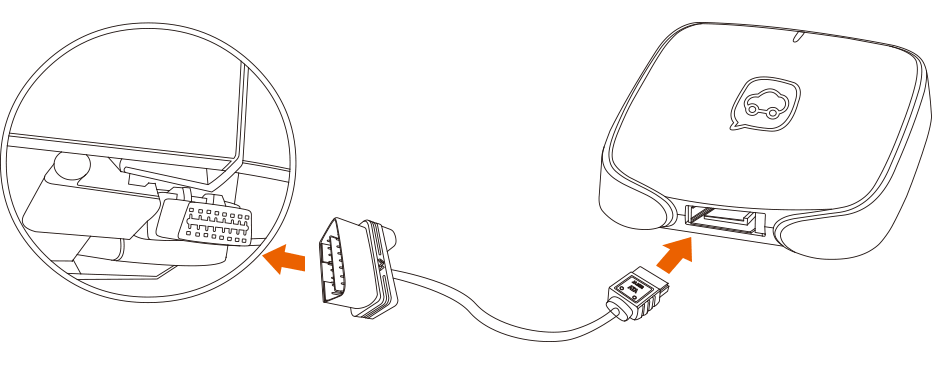
2. Where can I download the Autofun app from?
- You can download the app (Autofun App) from Apple Store for iPhone; search by keyword “Autofun”.
- However, for android phones you will require to access this link and download Autofun mobile app, namely carsmart.asia/downloads/AF_V1.2.6.apk
- Alternatively, visit our telematics portal and view the videos for understanding the process of downloading Autofun mobile app.
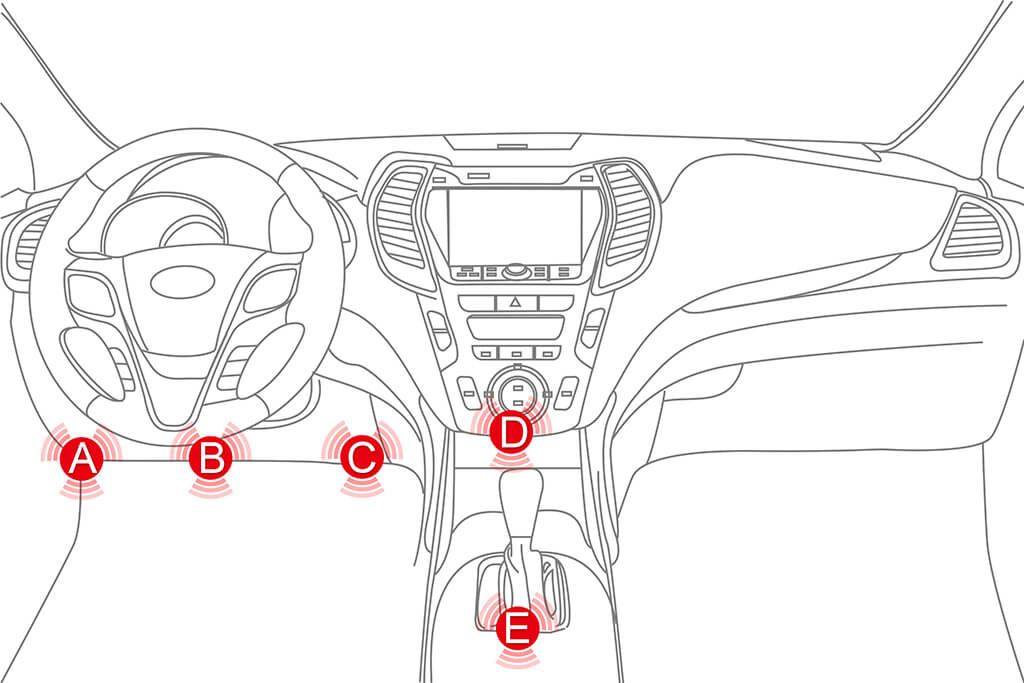
3. Where can I find the OBD port on my car?
You can find the OBD port of your car depending on car make and model in either 5 locations inside the front driver/ front passenger side of the car (along the dashboard compartment below. You may refer your car user guides to identify the location of OBD port, alternatively do a “google search” based on your car’s brand name and model.
4. Does the Device require a SIM card and
how do I purchase the SIM and data Plan?
- InsureSavvy absorbs first-year telematics fee, if your annual motor insurance premium ( excluding lorries and vans ) is more than or equal to RM1,000 on year 2019.
- Thereafter, when annual renewal premium of motor insurance is less than RM1,500 on year 2020 ( excluding lorries and vans ), the fee of renewing telematic services is set RM98 per annum on year 2020. The future telematics fees will subject to pricing revisions based on prevailing telco data plan’s charges setting on year 2021 and beyond.
- When your annual renewal premium of motor insurance is more or equal to RM1,500, on year 2020 ( excluding lorries and vans ), the costs of renewing telematics services will be fully absorbed continuously by InsureSavvy.
You may click this link for getting more pricing details, including lorries and vans.
5. How do I link my device to my Autofun App?
- You may link your device to your Autofun mobile app by keying in your device IMEI Number and Code Number (located on the back of your Device or printed on the side of the packaging Box) into your Autofun App.
- Alternatively, visit our telematics portal and view the videos for understanding the process of downloading Autofun mobile app and linking with its Autofun device.
6. After installation, when will my trips be logged in?
After your vehicle’s engine starts and engine stops upon installation of your Autofun device. Your 1st trip session will be logged in after you make your first 100-meter distance travel, with minimum speed 50km/hour.
7. Can I install the device in an underground carpark upon purchase?
No, it is not advisable to do so; you should install the device after purchase in an open area in order to allow the GPS and server to connect to your device without interruption.
8. Will I lose connection when I enter underground carparks?
You may incur service disruption (i.e. connectivity issues) in certain underground carparks due to telco tower transmission; however, rest assured your trip will be captured in your Autofun device and it will reconnect to our servers upon exiting said carpark.
9. If I don’t want to be tracked can I unplug the device from the OBD port?
Although we don’t encourage you to do so; you may unplug the device. However, Carsmart shall not be liable for lost data during this transgression; as one of the key features of our device is also its security features.
10. Does installing your device void the warranty claims on new vehicles?
Although our device only pulls information from your CPU and does not overwrite; its best to check with your car manufacturer / sales outlet on the warranty claims. However, our device is used on all major carmakers and we have yet to encounter any such issues.
11. Can I remove the device when I send in the car for servicing?
Some service centres would use your existing OBD ports for diagnostic and analysis of your vehicles; if they wish to do so they can temporarily disconnect and reconnect the device after use.
Have a question you would like to submit to the Insure Savvy?
Send in your question using the form below, keep them brief and to the point, and provide your contact information to help us respond to your question.